 This post is short and sweet.
If you want to know how to create a "vista style" toolbar in Apex see http://apex.oracle.com/pls/otn/f?p=200801:2012:0
It's easy to customize it, if you like the interactive behaviour, but not the look.
This post is short and sweet.
If you want to know how to create a "vista style" toolbar in Apex see http://apex.oracle.com/pls/otn/f?p=200801:2012:0
It's easy to customize it, if you like the interactive behaviour, but not the look.
Wednesday, October 15, 2008
Vista Style Toolbar in Oracle Apex
This post is short and sweet.
If you want to know how to create a "vista style" toolbar in Apex see http://apex.oracle.com/pls/otn/f?p=200801:2012:0
It's easy to customize it, if you like the interactive behaviour, but not the look.


Saturday, September 27, 2008
Oracle OpenWorld - done and dusted
 Oracle OpenWorld is over for another year, and it's time to review the key messages for Oracle Apex.
This was my first visit to OpenWorld, my previous experiences limited to downloading presentations.
So was it worth flying all the way from Australia to see it in person?
Absolutely - you get so much more from hearing and talking directly to the presenters.
Standouts for me: Tom Kyte's presentation on database schema design.
I'd downloaded much of the content of his presentation from other events, but had missed the power of the message. Hearing and seeing the demo really opened my eyes - I'll be reviewing my database design when I get back to work.
Tom will be presenting at the AUSOUG conference in October, so delegates to the Australian event are in for a treat.
Carl Backstrom's presentation on Web 2.0 functionality coming in Oracle Apex.
It was great to hear the enthusiasm about the upcoming functionality from Carl. If your not already starting to incorporate AJAX functionality into your applications, it's definitely time to get your head in that space.
I caught up with Carl on the Demo grounds, to see the Web-Sheets functionality, which takes interactive reports to a whole new level. It allows interactive AJAX based editing directly in the report, as well as allowing end users to define and share sheets.
Carl was also very excited that the Oracle legal team have given him the go-ahead to use jQuery in Apex. It means he can focus on higher level AJAX functionality, rather than getting down and dirty with the DOM. Apex 4.0 is very focused on delivering declarative functionality to developers, so they don't have to know AJAX.
And finally, meeting and networking with Apex users. With 33 presentations related to Apex, the enthusiasm for Apex can't be underestimated. Time after time, presenters shared their success stories on Apex, on how quick the development time was, how short the learning curve was, and the value add it gave to their organisations.
Monday, August 25, 2008
How to make the Oracle Apex calendar start with Monday
BHavesh recently asked on my blog how to get a date picker which shows Monday as the first day.
 The NLS_TERRITORY is set to "AUSTRALIA".
A quick look in the manual revealed
The NLS_TERRITORY is set to "AUSTRALIA".
A quick look in the manual revealed

The default apex date picker shows Sunday as first day. But I can see on your example, the default apex date picker has Monday as first day. Is there a way I can also make my default apex date picker to show monday as first day.Good question BHavesh, I wasn't entirely sure how I did it either. It wasn't a conscious decision on my part, but a quick look with session debugging on revealed the answer, as you can see in the image below.

NLS_TERRITORY specifies the name of the territory whose conventions are to be followed for day and week numbering.So there's your answer - the territory setting establishes the week numbering. And where to set it in Oracle Apex? See below.This parameter also establishes the default date format, the default decimal character and group separator, and the default ISO and local currency symbols.

Friday, August 15, 2008
Oracle Apex - AJAX form created from Javascript
 One of the really nice features of using ExtJS is just how easy it is to create a form using javascript.
Combining it with the new Apex global variables which Carl Backstrom blogged about in May gives some very interesting opportunities.
It means it is now possible to have functionality sitting in a application javascript library ready for use on every page.
This is exactly what is happening in IRR reports, and the upcoming Websheets functionality.
Combine this with the ability to interrogate your application using the Apex dictionary views, and suddenly the world is your oyster.
Have a play with AJAX Form using Globals on my demo site.
I'm using the same concept for a AJAX editable tree, which I'll be talking about at Oracle OpenWorld this year.
Provided I finish building it... :)
Here's a screenshot of current progress. Mark

Friday, July 25, 2008
Selecting Apex page items by class using $x_ByClass
I just noticed an $x_ByClass example on Carl Backstrom's demo site which selects page items using the class attribute.
So why is this important?
It provides you with a mechanism to easily tag form items, typically text input fields, so you can add AJAX functionality to them.
In Carl's demo he is simply changing the the border color of datepicker items, as a proof of concept. This is exactly the same technique I use with ExtJS to:
It means that developers can easily hook in widgets and AJAX functionality, because the low level plumbing has been done for us.
Mark
So why is this important?
It provides you with a mechanism to easily tag form items, typically text input fields, so you can add AJAX functionality to them.
In Carl's demo he is simply changing the the border color of datepicker items, as a proof of concept. This is exactly the same technique I use with ExtJS to:
- convert text items into javascript datepickers
- create AJAX lookup fields
- make textareas resizable (strictly speaking I select by itemtype)
It means that developers can easily hook in widgets and AJAX functionality, because the low level plumbing has been done for us.
Mark
Thursday, June 19, 2008
Oracle Apex Builder CSS fix for Firefox3
Does Firefox3 do this to your Oracle Apex Builder?

The fix is to disable a CSS attribute for the "fieldset.lov" class, as seen here using Firebug

To permanently fix the CSS, modify the apex_3_1.css file. Search for "fieldset.lov" and delete the "height:1em;" attribute.
I haven't tested to see if this has other undesirable side affects, but so far so good.
MarkFriday, June 13, 2008
Tabbed Regions in Oracle Apex using Extjs
David from Scotland emailed asking how I implemented tabbed regions on my demo site.

It's actually very easy using Extjs.
Step 1 - Create a region template which uses static ids
<div id="#REGION_STATIC_ID#" class="tab-content">
<div class="x-fieldset-bwrap" style="padding:10px">
<div align="right" class="x-fieldset-tbar">#CLOSE##PREVIOUS##NEXT##DELETE##EDIT##CHANGE##CREATE##CREATE2##EXPAND##COPY##HELP#</div>
<div class="x-fieldset-body"> #BODY# </div>
</div>
</div>
Step 2 - Create your report/form regions as usual, but assigning them a static id.
I tend to use tab1, tab2, ..., tabn - but that's a personal choice.
Step 3 - Add an opening div tag before the first tab region and a closing div tag after the last region. <div id="pageTabs"> </div>
You can either create extra regions of type "html text" with no template, or simply add the extra tags in your region header and region footer. I use extra regions, so it's really obvious whats going on when I look at again in 6 months time.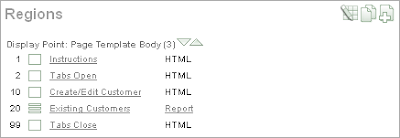 When the page is generated the html will look like this:
<div id="pageTabs">
<div id="tab1" class="tab-content"> <!-- content --> </div>
<div id="tab2" class="tab-content"> <!-- content --> </div>
<!-- and so on -->
<div id="tabn" class="tab-content"> <!-- content --> </div>
</div>
Step 4 - Add the javascript magic Here I'm showing 2 tabs, and usually include the script with the closing div tag.
The cls: 'prism' is a customisation I use to have a blue background for the tab panel.
I'll leave that for you to work out how I did that.
As usual, the documentation on tab panels goes into far more details. Mark

Step 1 - Create a region template which uses static ids
<div id="#REGION_STATIC_ID#" class="tab-content">
<div class="x-fieldset-bwrap" style="padding:10px">
<div align="right" class="x-fieldset-tbar">#CLOSE##PREVIOUS##NEXT##DELETE##EDIT##CHANGE##CREATE##CREATE2##EXPAND##COPY##HELP#</div>
<div class="x-fieldset-body"> #BODY# </div>
</div>
</div>
Step 2 - Create your report/form regions as usual, but assigning them a static id.
I tend to use tab1, tab2, ..., tabn - but that's a personal choice.
Step 3 - Add an opening div tag before the first tab region and a closing div tag after the last region. <div id="pageTabs"> </div>
You can either create extra regions of type "html text" with no template, or simply add the extra tags in your region header and region footer. I use extra regions, so it's really obvious whats going on when I look at again in 6 months time.
 When the page is generated the html will look like this:
<div id="pageTabs">
<div id="tab1" class="tab-content"> <!-- content --> </div>
<div id="tab2" class="tab-content"> <!-- content --> </div>
<!-- and so on -->
<div id="tabn" class="tab-content"> <!-- content --> </div>
</div>
Step 4 - Add the javascript magic Here I'm showing 2 tabs, and usually include the script with the closing div tag.
<script type="text/javascript">
Ext.onReady(function(){
       var tabs = new Ext.TabPanel({
           cls: 'prism',
           applyTo: 'pageTabs',
           plain: true,
           width: 795,
           //height: 450,
           autoHeight:true,
           enableTabScroll:true,
           autoScroll:true,
           activeTab: 0,
           deferredRender: false,
           border: true,
           defaults: {layout:'fit', autoScroll:true},
           items:[
               {contentEl:'tab1', title:'Create/Edit Customer'},
               {contentEl:'tab2', title:'Existing Customers'}
           ]
           });
});
</script>
The cls: 'prism' is a customisation I use to have a blue background for the tab panel.
I'll leave that for you to work out how I did that.
As usual, the documentation on tab panels goes into far more details. Mark
Subscribe to:
Posts (Atom)